
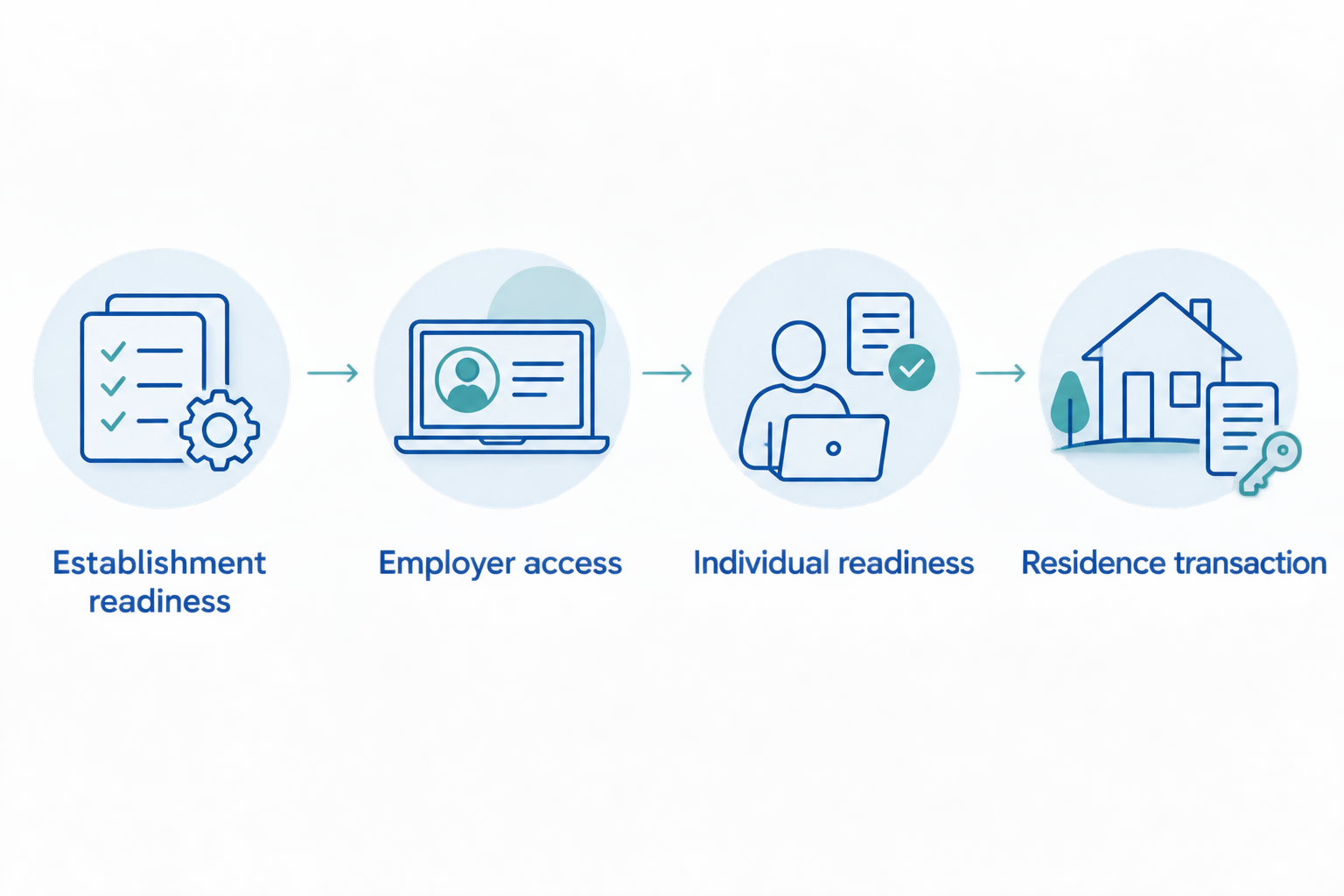
Instead of manually chasing disconnected company and employee records, structure your company formation to Muqeem residency workflow around establishment activation, employment eligibility and residence issuance. For a 2026 application, complete each prerequisite before submitting the next transaction; a commercial registration alone does not establish an employee’s right to work or reside in Saudi Arabia.
- Company formation to Muqeem residency requires establishment readiness, an eligible employment route and completed residence prerequisites.
- Gofico supports foreign companies with Saudi business setup, licensing and ongoing compliance.
- Qiwa handles labour services; Muqeem supports employer residency transactions. Neither replaces company formation.
- Confirm the individual’s immigration route before arranging work permits or submitting residence applications.
Why this matters
A Saudi company’s legal existence, permission to employ and ability to complete residency transactions are separate controls. Treating them as interchangeable creates incomplete applications and leaves your team solving the wrong problem.
Start with the MISA-to-commercial-registration workflow if your entity is not yet established. MISA means the Ministry of Investment of Saudi Arabia; confirm the investment registration or authorisation applicable to your activity rather than assuming every foreign business follows an identical licensing route.
Gofico is best suited to foreign companies seeking business setup and ongoing compliance support in Saudi Arabia. Define that support around specific deliverables, while keeping government decisions separate from the adviser’s responsibilities.
Before you start
- Company records and authorised access: Assemble incorporation documents, commercial registration details, establishment identifiers and the authority of the person managing submissions. Arrange access to the relevant government and employer portals through properly authorised users.
- An identified residency route: Establish whether the person is an employee arriving from abroad, an employee transferring within Saudi Arabia, or an investor pursuing a different residence route. Collect the passport and supporting employment or investment documents appropriate to that route.
- The non-obvious gotcha: A person’s ownership or management role does not automatically determine their immigration category. Confirm the route before arranging employment permissions, travel or an Iqama application. An Iqama is the Saudi residence permit issued to an eligible foreign resident.
For your 2026 setup file, nominate a company-side decision-maker and a transaction owner. The same person can hold both responsibilities, but everyone should know who approves documents and who resolves rejected submissions.
Company and establishment records
Configuration unit: establishment readiness
- Confirm the permitted activity. Match the proposed business activity, ownership structure and investment requirements before completing formation. Identify any sector-specific permissions separately; commercial registration does not replace regulated-activity approval.
- Complete legal formation. Finalise the constitutional documents and obtain the commercial registration through the applicable Ministry of Commerce or Saudi Business Center process. Check the registered name, activity and authorised manager against the approved documents.
- Check establishment records. Confirm the company’s labour and other applicable establishment registrations. Record the identifiers used by each authority rather than assuming the commercial registration number is the only reference needed.
- Verify administrative authority. Establish who can act for the business, receive authentication requests and manage delegated access. Do not make an external adviser’s personal access the company’s only means of administration.
- Assign continuing obligations. Allocate responsibility for commercial registration maintenance, registered address information, tax registration and sector approvals where applicable. Residency processing does not suspend those obligations.
Expected result: Your business has a documented legal identity, an identified employer establishment and authorised people who can manage the next stage.
Use a simple handover sheet containing the company name, commercial registration reference, establishment references, authorised representative and outstanding actions. Keep passport copies and authentication credentials outside a broadly shared tracker; the tracker should identify the responsible person, not expose sensitive access details.
Employment and portal access
Configuration unit: employer access
- Open the correct establishment in Qiwa. Qiwa is the Ministry of Human Resources and Social Development’s platform for labour-market services. Confirm that the user’s authority covers the intended establishment and transaction.
- Check establishment eligibility. Review the requirements shown for the intended employment service, including applicable Saudization and labour-compliance conditions. Saudization is the framework governing employment of Saudi nationals; Nitaqat is the related establishment classification programme.
- Identify the employment transaction. For an overseas recruit, establish the applicable work-visa process. For an employee already in Saudi Arabia, determine whether an employer transfer is required. Do not treat either route as a residence-permit application by itself.
- Complete the applicable employment formalities. Arrange the employment contract, approvals and work-permit steps relevant to the individual’s route. Follow the transaction’s actual dependency order rather than issuing documents simply because a portal lets you begin.
- Arrange authorised Muqeem access. Muqeem is an employer-facing service for resident information and passport-related transactions. Confirm establishment access, user permissions and the availability of the required service before scheduling the residency submission.
Expected result: The company can access the appropriate labour and residency services, and each employee has an identified route rather than an assumed entitlement.
For the labour-permit stage, use the MISA-to-Qiwa work-permit guide alongside the requirements displayed for your establishment. Formation records support the process; they do not create an automatic connection that approves employment.
Which platform handles which task?
These are complementary systems, not competing products. Use each for its defined role and confirm the current service scope through the responsible authority.
| System or authority | Best for | Practical benefit | Boundary |
|---|---|---|---|
| Ministry of Commerce / Saudi Business Center | Company formation and commercial registration | Establishes the company’s commercial identity | Does not itself grant an employee residence permission |
| Qiwa | Employer labour transactions | Provides labour-service access for eligible establishments | Does not replace passport-authority residence issuance |
| Muqeem | Employer residency administration | Supports resident records and available residency transactions | Requires authorised access and transaction eligibility |
| General Directorate of Passports, or Jawazat | Immigration and residence authority requirements | Defines the immigration controls relevant to issuance | Does not replace labour or commercial registration requirements |
Employee records and residence issuance
Configuration unit: individual readiness
- Match identity details. Compare passport information with the visa, entry or existing residence record and the employment documents. Resolve discrepancies through the responsible system before relying on the data downstream.
- Confirm the person’s immigration position. For an overseas hire, verify lawful entry under the appropriate route. For an existing resident, confirm the transfer position and current record. A business visit does not substitute for employment authorisation.
- Complete applicable prerequisites. Check the requirements for medical fitness, health insurance, biometrics and work permission against the person’s category and intended transaction. Complete the applicable requirements through the recognised channels.
- Check the employer relationship. Confirm that the individual’s record is associated with the intended employer at the stage required by the transaction. If a transfer remains incomplete, resolve that dependency before attempting the next service.
- Review the submission evidence. Record which prerequisite is complete, where its status is visible and who resolves a mismatch. A receipt or uploaded document is not proof that every connected system has accepted the update.
Expected result: The employee’s identity, immigration position and applicable supporting records are ready for the residence transaction.
For a practical 2026 readiness check, review 1 employee record end to end before processing the remaining workforce. This is an internal quality-control recommendation, not a government sequencing requirement or a promise that later applications will succeed.
Configuration unit: residence transaction
- Select the correct resident service. Within the authorised Muqeem account, identify the service appropriate to initial issuance, renewal or another permitted action. Read the live eligibility conditions before proceeding.
- Review the retrieved record. Check the individual, employer and transaction details. Stop if the wrong person, establishment or service appears; correcting the source record is safer than submitting against inaccurate information.
- Resolve outstanding prerequisites. Follow any displayed requirement or rejection reason through the responsible authority or service provider. Do not submit a different immigration transaction merely to bypass a blocked application.
- Submit through the authorised user. Retain the transaction reference and resulting status. Distinguish a submitted request from a completed residence transaction in your internal tracker.
- Verify the issued record. Check the residence information and relevant dates after completion. Arrange any applicable document-delivery or follow-up steps through the available official service.
Expected result: You have a confirmed transaction outcome and a checked residence record, or a clearly assigned unresolved requirement—not merely evidence that someone started an application.
Renew residency when employee records change
An existing resident’s renewal is an adjacent workflow, not a repeat of company formation. Start with the current employee and establishment records, then identify which requirements apply to renewal.
- Review the current record. Check residence validity, passport information, employer association and the intended transaction.
- Check continuing eligibility. Review applicable work permission, insurance and establishment conditions through the relevant services.
- Resolve changes first. Correct passport updates, incomplete transfers or other record discrepancies through the appropriate process before relying on them for renewal.
- Complete and verify renewal. Submit the appropriate transaction through an authorised channel, confirm the outcome and update the compliance calendar.
For a 2026 compliance calendar, record both the relevant expiry date and the person responsible for checking prerequisites. An internal reminder is useful only if someone owns the action it triggers.
Do not confuse a passport-information update, an employer transfer and an Iqama renewal. Each addresses a different record or permission; completing one does not prove that the others are complete.
Troubleshooting blocked submissions
The establishment does not appear in the account
Check that the user has access to the correct legal entity and establishment. Verify delegation and registration details through the responsible platform; creating another user does not correct an underlying establishment mismatch.
The employee is missing or linked to another employer
Check the entry or transfer status and compare the identifying information used in the search. Resolve the underlying employment or immigration record before attempting residence issuance under the new employer.
Insurance or another prerequisite is not recognised
Ask the responsible provider or authority to confirm the identity details, effective status and electronic submission. Recheck the receiving system after the source record is corrected; a document in your email inbox is not the same as an accepted electronic record.
A labour-compliance condition blocks the next step
Read the specific condition displayed for the establishment and transaction. Assign the correction to the company’s labour-compliance owner rather than treating the issue as a Muqeem access problem.
The submission is recorded but completion is unclear
Use the transaction reference to check the authoritative status. Keep the internal task open until completion is confirmed or the rejection reason has an assigned corrective action.
Customize your workflow
Build 2 control lists: one for company-level obligations and one for employee-level obligations. Keep them connected through the establishment reference, but give each obligation its own owner and evidence of completion.
- Company controls: Commercial registration maintenance, activity permissions, labour-establishment conditions and applicable tax obligations.
- Employee controls: Passport details, employment status, work permission, insurance and residence validity.
Gofico’s business setup and ongoing compliance support fits this division of responsibilities. An adviser can coordinate documents and administrative work; government authorities retain responsibility for eligibility decisions and approvals.
The benefit of external coordination is a defined handover across formation and compliance tasks. The limitation is equally important: Gofico cannot replace employer authorisation, applicant eligibility or official approval.
Plan your Saudi setup handover
Discuss formation, employer registration and residency dependencies for your foreign company.
FAQ
How do I move from company formation to Muqeem residency?
Complete company and employer establishment requirements, confirm the individual’s immigration route, satisfy the applicable prerequisites and submit the appropriate residence transaction. Commercial registration alone does not authorise employment or residence.
Does opening a Saudi company automatically give me an Iqama?
No, opening a Saudi company does not automatically grant an Iqama. Confirm the residence route applicable to your ownership, employment or other qualifying position before arranging the application.
Is Muqeem the same as Qiwa?
No, Muqeem and Qiwa serve different administrative functions. Qiwa provides labour-market services, while Muqeem supports employer-facing resident information and passport-related transactions.
Can I use a business visit visa instead of employment residency?
A business visit visa is not a substitute for employment authorisation and residence permission. Confirm the permitted activities and correct immigration route before the individual starts work.
Do existing Saudi residents follow the same process as overseas hires?
Existing Saudi residents and overseas hires do not necessarily follow the same process. An existing resident changing employers needs the applicable transfer process, while an overseas recruit follows the relevant recruitment, visa and entry requirements.
What should I do if Muqeem does not recognise a completed prerequisite?
Check the source record with the responsible provider or authority and confirm that the identifying details match. Correct the underlying record before retrying the residence transaction.
Can Gofico guarantee residency approval after company formation?
No, Gofico’s formation and compliance support does not guarantee residency approval. Government authorities assess the company, individual and transaction against the applicable requirements.
One last thing
Test the handover, not just portal access. Before scheduling employee mobilisation in 2026, ask the transaction owner to identify the correct establishment, individual route, outstanding prerequisite and approval status. A working login proves access—not readiness to issue residency.
Related guides
- Commercial registration to Qiwa activation
- Compliance obligations for foreign companies
- Visa categories for foreign employees