
Instead of manually resubmitting investment documents to resolve a Qiwa work-permit problem, verify the company records that connect your investment registration, commercial registration and labour establishment file. Moving from a MISA license to Qiwa work permit issuance means completing that registration chain—not uploading a MISA document to obtain automatic work-permit approval.
- The MISA license to Qiwa work permit workflow depends on commercial registration, establishment activation and employee eligibility.
- Gofico supports foreign companies with Saudi business setup and ongoing compliance, including the obligations surrounding employment.
- Resolve establishment-record problems before submitting an employee work-permit application.
- A work permit does not replace an employment visa, residence permit or professional licence.
Why this matters
The Ministry of Investment of Saudi Arabia, or MISA, handles the investment side of foreign-company market entry. Qiwa is the labour-services platform associated with the Ministry of Human Resources and Social Development, or HRSD. Investment registration and permission to employ a particular worker are separate requirements.
For the earlier formation stage, follow the MISA license to commercial registration workflow. A commercial registration, commonly called a CR, records the business with the Ministry of Commerce; it is not an employee work permit.
For a 2026 application, consult MISA's investment-registration guidance and Qiwa's official work-permit guidance before submitting. Investment registration is the current framework, although investors still use the expression MISA license. Do not treat an older document name as evidence that a separate Qiwa linking function exists.
Gofico is best for foreign companies seeking Saudi business setup and ongoing compliance support. Its support does not replace government eligibility checks or approval decisions.
Before you start
- Company records: Prepare your investment-registration documents, CR details and labour establishment identifiers. Identify the legal entity and branch that will employ the worker; do not assume every branch uses the same labour record.
- Access and employee information: Arrange authorised access to the business establishment in Qiwa. Have the worker's identification details and immigration or employment records appropriate to the transaction ready.
- The non-obvious blocker: Seeing the company in Qiwa does not establish that every employee is eligible for a work permit. Establishment compliance, employee status and the selected transaction still need separate checks.
Assign responsibility before starting: your company signatory authorises access, your setup administrator checks company records, and your employment administrator checks the worker's status. One person can hold several responsibilities, but access must remain properly authorised.
Configuration unit: Company identity
Verify the investment and commercial records
- Confirm the employing entity. Identify the Saudi company or branch that will sign the employment contract. Use that entity throughout the application rather than mixing a parent company's documents with a subsidiary's records.
- Check the investment record. Review the legal name, permitted activity and registration details against the intended Saudi operation. Resolve an incorrect activity or company identity with the responsible authority before progressing.
- Check the commercial registration. Compare the registered business details with the investment record. Explain legitimate differences, such as Arabic and English name formats, rather than changing records solely to make their typography identical.
- Create a reference sheet. Record the relevant company and establishment identifiers, document status and responsible contact. Keep copies of the supporting documents with that sheet.
Expected result: You can identify the employing entity and explain how its investment and commercial records relate. There is no unresolved uncertainty about which company is applying.
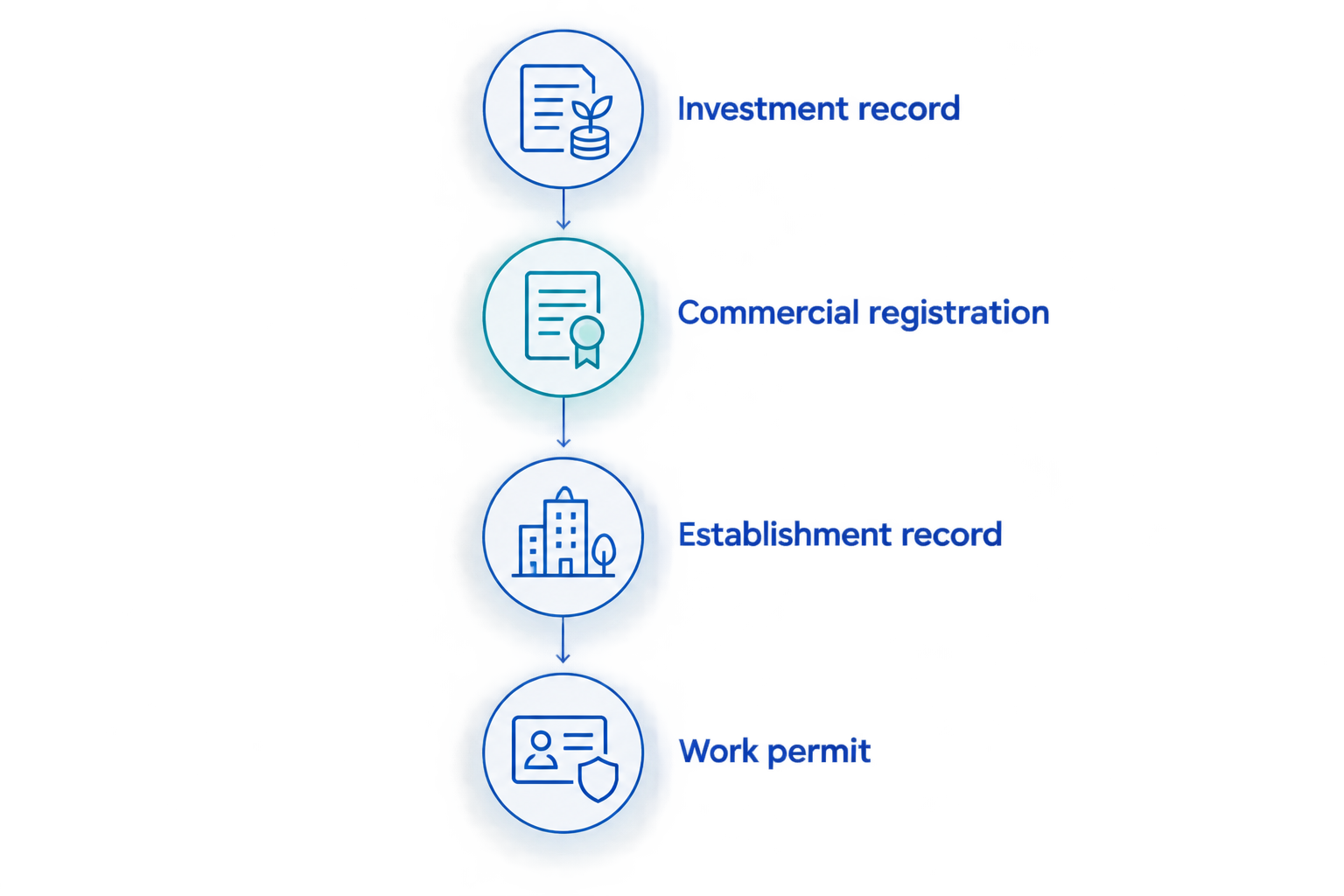
Use these 4 checkpoints for your 2026 setup file:
- Investment record: Foreign-investment status and permitted activity.
- Commercial registration: Registered business identity.
- Establishment record: Labour-system identity for the employer.
- Work permit: Employee-specific labour authorisation.
Configuration unit: Qiwa establishment access
Verify the labour establishment and permissions
- Sign in through the authorised business account. Use the access method presented by Qiwa. Do not share another user's identity credentials to bypass an access problem.
- Select the employing establishment. Compare the displayed establishment details with your reference sheet. If several establishments appear, identify the correct one before opening an employee service.
- Review account permissions. Confirm that the authorised user can access the relevant employment services. Ask the account administrator to resolve insufficient permissions rather than creating an unrelated establishment.
- Inspect establishment status. Review the notices and compliance information displayed in Qiwa. Record the exact blocking message, affected establishment and transaction before requesting help.
- Resolve upstream discrepancies. If a commercial or labour record is incorrect, identify which authority maintains that information. Correcting a source record and restoring Qiwa access are different tasks.
Expected result: The correct establishment is visible to an authorised user, and you understand any restriction affecting the work-permit service.
Do not repeatedly upload the MISA document when the actual problem concerns user permissions or an incorrect establishment selection. Neither action corrects the other.
Configuration unit: Employee eligibility
Check the worker before requesting a permit
- Identify the employment route. Establish whether this is an initial permit, a renewal or a worker-transfer situation. These are not interchangeable transactions.
- Confirm the worker's record. Check the identification details and relationship to the selected employer. A worker missing from the relevant employer record requires investigation before submission.
- Review establishment compliance. Check the conditions Qiwa displays for the requested service. Saudization—the employment of Saudi nationals—and Nitaqat, the associated establishment-classification programme, are relevant compliance considerations; do not assume one universal threshold applies to every business.
- Check profession-specific requirements. Determine whether the proposed occupation requires separate professional registration or approval. A company registration does not replace an individual's professional requirements.
- Separate immigration tasks. Confirm which visa, transfer or residence steps apply to the worker. A work permit is not permission to enter Saudi Arabia and does not itself replace an Iqama, the Saudi residence permit.
Expected result: You know the correct transaction and have identified any employee-specific or establishment-level blocker.
For 2026 hiring plans, use Qiwa's live eligibility result and HRSD's applicable guidance rather than a saved screenshot from another employer. Different establishment and worker records require their own assessment.
Configuration unit: Application and payment
Submit the work-permit request and verify completion
- Open the work-permit service. Within the correct establishment, choose the transaction appropriate to the employee. Follow the wording shown in your authenticated account rather than searching for a MISA connection button.
- Select the eligible worker. Compare the displayed identity with your employment file. Stop if the record belongs to another person or the employment relationship is incorrect.
- Review the application. Check the transaction details, any available permit-period selection and the government payment information shown by the service. Do not treat a consultant's invoice as evidence that government payment is complete.
- Complete the required payment process. Use the payment reference and instructions generated for that application. Retain the reference, payment evidence and submission details together.
- Verify the final status. Return to the service and confirm the permit outcome. A generated payment reference or bank debit is not, by itself, confirmation that the permit has been issued.
Expected result: The service records the completed permit transaction, or it gives you a specific outstanding action to resolve.
Keep government requirements and payments separate from Gofico's business setup and compliance services. Professional assistance supports preparation and follow-up; the responsible authority decides the application.
Second variant: Renew an existing Qiwa work permit
A renewal starts with an existing worker and permit record, not a fresh company-formation exercise. Recheck the establishment and employee status instead of assuming that the previous issuance proves current eligibility.
| Workflow | Best for | Advantage | Limitation |
|---|---|---|---|
| Initial work-permit issuance | An eligible worker needing an initial permit under the employer | Establishes the employee's work-permit record | Depends on the correct employment route and establishment readiness |
| Work-permit renewal | A worker with an existing permit requiring renewal | Continues through the existing employee record | Previous issuance does not remove current compliance checks |
For a renewal, follow this sequence:
- Locate the worker's existing permit record under the correct establishment.
- Review current establishment restrictions and the worker's details.
- Select the renewal transaction and review the information presented.
- Complete the required payment and verify the resulting permit status.
Do not start a new initial-permit request to work around a renewal restriction. Diagnose the restriction first. If employment is moving to another company, assess the transfer process separately rather than treating it as a routine renewal.
The advantage of this shared workflow is a consistent set of checks. Its limitation is equally important: a document checklist cannot override the eligibility decision returned for a particular employee.
Troubleshooting
The company does not appear in Qiwa
Check that you are using the authorised account and looking for the correct labour establishment. Compare the establishment identifiers with the company's formation records. Escalate an absent or incorrect labour record through the appropriate official support channel; do not register a duplicate entity as a shortcut.
The company appears, but the service is inaccessible
Separate a user-access restriction from an establishment-compliance restriction. Ask the account administrator to review permissions, then inspect the establishment notices. Send support the exact error text and affected service, without exposing passwords or identity-verification codes.
The employee cannot be selected
Check the worker's identification details, employment relationship and transaction type. An entry-visa case, an existing employee and a proposed transfer do not necessarily begin at the same point. Correct the underlying employment record before repeating the application.
Qiwa blocks the application on compliance grounds
Read the stated condition and identify the responsible authority or system. Check the establishment's relevant Saudization, registration or other compliance status against official guidance. Do not assume that uploading investment documents removes a labour-compliance restriction.
Payment is complete, but issuance is not confirmed
Match the payment reference to the application and inspect its current status. Retain the receipt and transaction reference for support. Verify the first payment before initiating another one; repeated payment does not explain or resolve the original status discrepancy.
Customize your workflow
Turn the 2026 setup process into an ongoing compliance routine. Maintain 1 company reference sheet and a separate employee checklist for each application, with clear ownership for corrections, submission and final verification.
Track 3 status stages: prepared, submitted and confirmed. This prevents a submitted request from being reported internally as an issued permit. Record the supporting evidence alongside each confirmed outcome.
Gofico's business setup and compliance support covers initial formation and ongoing obligations. The practical benefit is assistance across those connected stages; the boundary is that government decisions and employee eligibility remain outside a service provider's control.
For a case-specific discussion, contact Gofico with your company stage, establishment issue and proposed employment route. Describe the blocker first; share sensitive identity documents only through an agreed secure process.
Plan your setup and compliance support
Discuss company formation, establishment readiness and ongoing employment-compliance support.
FAQ
How do I connect a MISA license to a Qiwa work permit?
Complete and verify the company’s investment, commercial and labour establishment records, then apply for the eligible employee through Qiwa. A MISA document does not automatically create an employee work permit.
Is there a MISA license upload that automatically activates Qiwa?
Do not treat a MISA document upload as automatic Qiwa activation. Verify the labour establishment record, authorised access and the specific requirements shown for the requested service.
Can I issue a work permit immediately after commercial registration?
Commercial registration alone does not establish work-permit eligibility. The labour establishment, account access, employee record and applicable compliance conditions must also be ready.
Does a Qiwa work permit replace an employment visa or Iqama?
No. A Qiwa work permit, an employment visa and an Iqama serve different purposes; confirm the immigration and residence steps relevant to the employee.
Why does Qiwa show my company but block work-permit issuance?
Company visibility does not establish transaction eligibility. Check user permissions, establishment restrictions and employee-specific conditions, using the exact message displayed in Qiwa.
Do I repeat company formation when renewing a work permit?
No. Begin with the existing worker and establishment records, then review current renewal eligibility and compliance conditions. Correct changed or inaccurate company information separately.
Can Gofico support the process without guaranteeing approval?
Yes. Gofico provides company formation, PRO, compliance and consulting services for foreign investors and entrepreneurs. Government authorities retain responsibility for eligibility assessments and approvals.
One last thing
The most useful handover document is an identifier map, not another copy of the investment document. For your 2026 operating file, show which legal entity, CR, labour establishment and employee record belong together. That makes it easier to identify the record behind a blocked transaction without confusing investment approval with employment authorisation.
Related guides
- Commercial registration to Qiwa activation workflow
- Connect your Qiwa account to GOSI for Saudization
- Compliance obligations for foreign companies in Saudi Arabia