
Instead of manually sending a Nitaqat certificate before every renewal, check your establishment’s live Saudization status and renew eligible employees’ work permits through Qiwa. The nitaqat certificate to qiwa permit renewal workflow is an eligibility check, not a PDF-upload integration; this guide explains the checks and renewal sequence for 2026.
- The nitaqat certificate to qiwa permit renewal workflow depends on establishment eligibility, not uploading a certificate.
- Check the correct establishment, live Saudization status and employee records before submitting a Qiwa renewal.
- Gofico provides business setup and ongoing compliance support for foreign companies in Saudi Arabia.
- A Qiwa work-permit renewal and an employee’s residence-permit renewal are separate procedures.
Why this matters
Nitaqat is Saudi Arabia’s establishment classification programme for Saudization, the employment of Saudi nationals. Qiwa is the Ministry of Human Resources and Social Development’s platform for employment services, including work permits. A Saudization certificate documents compliance status; it does not independently authorise a work-permit renewal.
Gofico’s business setup and compliance services are best for foreign companies seeking support with Saudi market entry and ongoing obligations. You can review Gofico’s services when formation records, employment registrations and renewal responsibilities need coordination.
For 2026 renewals, treat Qiwa’s official work-permit guidance and the Ministry’s Nitaqat guidance as the authority for service conditions. The eligibility result for your establishment and employee matters more than a previously downloaded certificate.
Before you start
- Account access: Have authorised access to the company’s Qiwa business account and the establishment whose employees need renewal. Confirm that the user can perform the required service, not merely view records.
- Employee materials: Prepare the relevant employee identification details, current permit records and the establishment identifiers needed to reconcile records. Keep the latest Saudization certificate available as supporting evidence, not as an assumed upload requirement.
- The non-obvious gotcha: A certificate saved earlier is not proof of current renewal eligibility. Changes to employment records, establishment classification or other service conditions can leave a certificate and the live renewal result telling different stories.
Do not start with the certificate file. Start with the establishment record. If the wrong entity or establishment is selected, every subsequent check concerns the wrong employer.
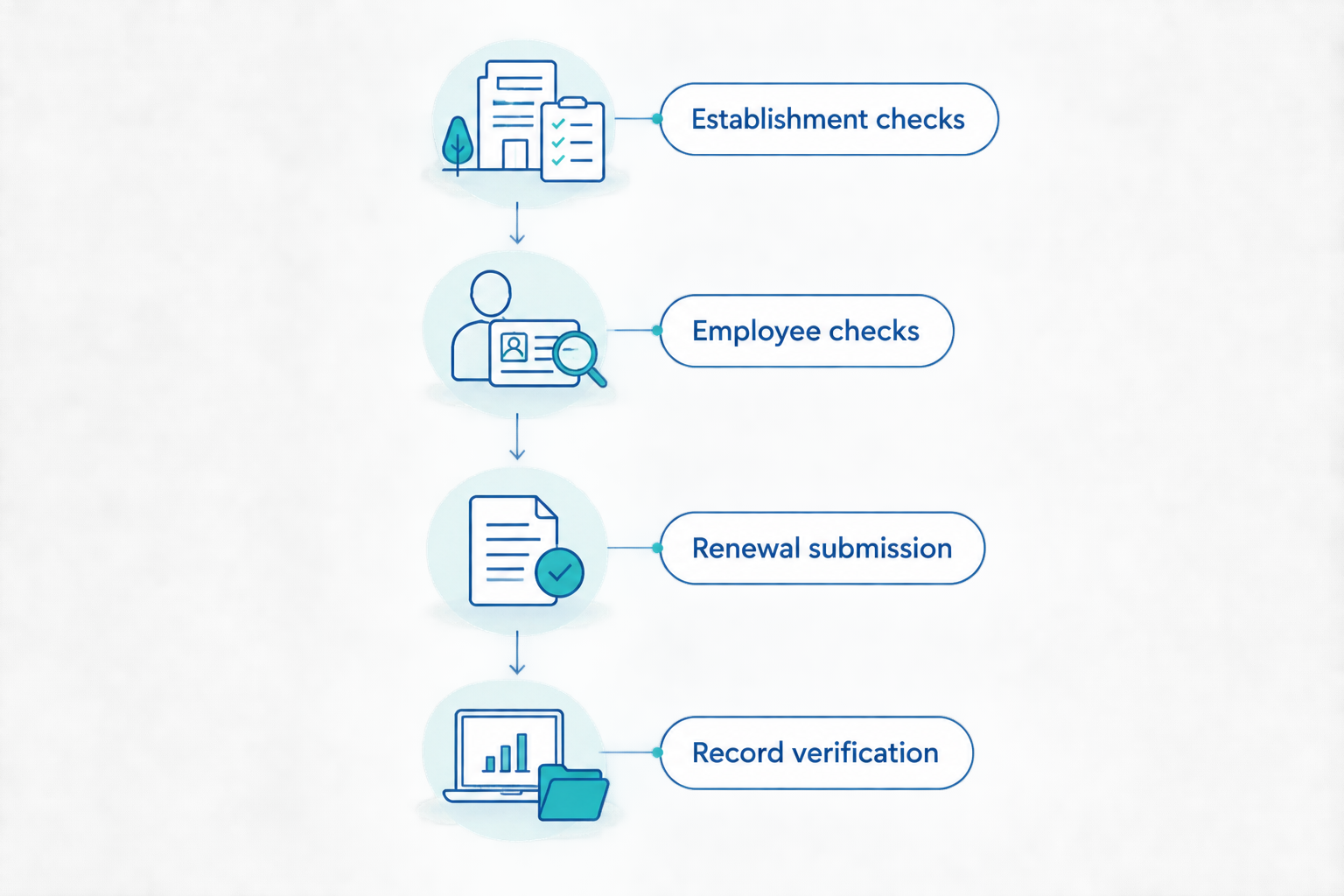
Establishment and status checks
Confirm the employer record
- Sign in to the company’s Qiwa business account using an authorised user.
- Select the establishment employing the workers whose permits require renewal.
- Match the establishment name and identifiers against your company’s employment records. For a foreign group with several Saudi entities, confirm the employing entity rather than relying on the group’s trading name.
- Review the establishment’s current Saudization information and any account notices relevant to employment services.
- Record the status shown and the date checked in your internal renewal file.
Expected result: You have identified the correct employer and its current status before opening a renewal request. A certificate belonging to another entity is no substitute for this check.
Separate evidence from eligibility
Keep 3 records distinct: the Saudization certificate, the live establishment status and the employee’s work-permit record. They answer different questions.
| Record or service | Best for | What it establishes | Limitation |
|---|---|---|---|
| Saudization certificate | Documenting compliance status | Evidence associated with the certificate’s issue and validity | Does not itself renew a work permit |
| Live establishment status | Checking the employer before renewal | Current classification and relevant account information | Does not replace employee-level eligibility checks |
| Qiwa work-permit service | Submitting an eligible renewal | The transaction and its recorded outcome | Does not complete residence-permit renewal |
This distinction prevents a common mistake: treating document possession as permission to transact. An available certificate is evidence, not a renewal approval.
Employee and eligibility checks
Reconcile the employee record
- Find the employee in the selected establishment’s records.
- Match the employee’s identifying information to your HR records. Do not select a similar name without checking the identifier.
- Confirm that the employee belongs under the establishment handling the renewal. Investigate a missing or unexpected record before proceeding.
- Review the current work-permit information and any eligibility message presented for that employee.
- Separate employees ready for renewal from employees requiring a record correction or another procedure.
Expected result: Each intended renewal belongs to the right employee and employer, with any blocking issue identified before submission.
For a 2026 renewal batch, maintain a simple register containing employee identifier, employing establishment, permit status, renewal owner and unresolved issue. Use controlled access because the register contains personal information. Avoid distributing identity documents through broad email groups.
Check the underlying Saudization data
When the establishment status does not match your understanding, compare the employment information held across the relevant systems. The General Organization for Social Insurance, or GOSI, holds social-insurance registration information that matters when checking workforce records.
Use the Qiwa and GOSI Saudization workflow to structure that reconciliation. Do not assume that editing an internal spreadsheet changes a government record.
Confirm that Saudi employees are correctly registered and that employment changes are recorded through the appropriate official process. If the establishment classification or activity appears incorrect, investigate that issue separately from an individual employee’s permit.
Correct the source record before retrying the renewal. Repeated submissions do not resolve inaccurate workforce information.
Qiwa renewal submission
Open the work-permit service
- In the correct establishment account, open Work Permits.
- Locate the employee requiring renewal and review the available transaction.
- Read the service conditions and any employee-specific validation message before continuing. Use the live portal’s instructions where the account language or screen layout differs.
- Review the employee details and the renewal information offered for that transaction.
- Submit only after checking the establishment, employee and selected transaction together.
Expected result: Qiwa either accepts the request for its next required action or identifies a condition preventing progress. Save the transaction reference or the exact blocking message.
There is no separate certificate-upload step that overrides these checks. If Qiwa requests supporting material for a particular case, follow that request; do not treat it as a universal Nitaqat-to-Qiwa connection procedure.
Complete and verify the transaction
- Follow the payment instructions generated for the renewal, where applicable, through the authorised government-payment route.
- Return to the work-permit record and check the transaction outcome. Payment confirmation alone is not your final verification.
- Confirm that the employee’s work-permit record reflects the completed renewal.
- Save the relevant transaction evidence in the employee’s controlled-access file.
- Pass the confirmed result to the person responsible for any separate residence-permit procedure.
Expected result: The employee’s work-permit record confirms renewal, or the transaction remains clearly assigned for follow-up. Do not mark the case complete merely because someone submitted a request.
Use 2 completion checks: confirm the transaction outcome and confirm the employee’s updated permit record. This gives HR and the responsible service provider a shared definition of completion.
Keep government transactions separate from the provider’s work. Government requirements determine eligibility and official processing; Gofico’s compliance support concerns assistance with the relevant procedures and obligations, not authority to approve a renewal.
Recheck eligibility after workforce changes
The adjacent workflow is a status recheck after a relevant employment-record change, rather than a routine renewal submission. Use it when correcting workforce information or investigating why a renewal is blocked.
- Identify the exact record that needs correction and the official system responsible for it.
- Complete the correction through that system’s applicable process.
- Retain the submission reference and check whether the corrected information is reflected in the relevant records.
- Reopen the establishment’s status in Qiwa and reassess the affected employee’s eligibility.
- Resume the renewal only when the required conditions are satisfied.
Best for: Establishments with a known data discrepancy or a renewal blocked by an issue requiring correction. The benefit is a traceable route from the problem to the renewed eligibility check; the limitation is that a correction does not guarantee approval.
Do not assume an immediate update between systems. For your 2026 process, follow the processing information published by the responsible authority and escalate a persistent mismatch with its reference numbers.
Keep this workflow separate from new employee onboarding, sponsorship transfers and residence-permit renewal. Similar employee details do not make those procedures interchangeable.
Troubleshooting
The certificate looks valid, but renewal is blocked
Read the live eligibility message before replacing or downloading the certificate again. Check the correct establishment, current Saudization information and employee-specific conditions. Resolve the condition identified by the service; a fresh PDF does not override it.
The employee does not appear under the establishment
Check the employee identifier and selected employer first. Then investigate whether the relevant employment or transfer process is complete. Do not submit a transaction against another employee’s record to keep the batch moving.
Saudization information differs across records
Compare the underlying workforce records rather than choosing whichever screen shows the preferred result. Confirm that the relevant registrations and employment changes are complete, then raise the unresolved discrepancy through the responsible official support channel with dated evidence.
The authorised representative cannot renew permits
Check the user’s access to the correct establishment and required service. Visibility is not the same as transaction authority. Ask the account’s authorised administrator to review permissions instead of sharing another person’s credentials.
Payment is complete, but renewal is not confirmed
Match the payment evidence to the correct transaction and employee. Review the transaction status before attempting another submission or payment. If the record remains unresolved, contact official support with the transaction reference and payment evidence, excluding unrelated employee information.
Customize your workflow
Assign ownership across HR, the authorised Qiwa user and whoever manages government-service follow-up. PRO services are administrative support for dealings with government authorities; using that support does not transfer the employer’s compliance responsibilities to the provider.
For 2026, build your renewal register around 1 named owner per unresolved case. Add the next action, responsible authority and supporting reference so a rejected transaction does not sit between teams without an owner.
Best for: Foreign companies coordinating initial business setup with recurring employment compliance. Gofico supports both areas, but the engagement should identify which records, submissions and follow-up tasks are included. Support does not guarantee a particular Nitaqat classification or permit approval.
Discuss your renewal compliance workflow
Explain your establishment status, blocked transaction and the support your company needs.
FAQ
How do I connect a Nitaqat certificate to Qiwa permit renewal?
You do not create a separate PDF-based connection for a standard Qiwa work-permit renewal. Check the establishment’s live Saudization information, confirm employee eligibility and complete the renewal through the work-permit service.
Do I need to upload a Saudization certificate for every renewal?
A certificate upload is not a universal step in the standard work-permit renewal workflow. Follow any supporting-document request shown for your specific transaction rather than assuming the certificate itself enables renewal.
Why does Qiwa block renewal when my Saudization certificate is valid?
A valid certificate does not establish that every current renewal condition is satisfied. Check the live establishment status, employee record and exact eligibility message to identify the blocking condition.
Does renewing a Qiwa work permit renew the employee’s Iqama?
No, a Qiwa work-permit renewal does not itself complete Iqama renewal. An Iqama is a residence permit, and its renewal follows the relevant residence procedures and conditions.
Will updating GOSI records immediately change my Qiwa eligibility?
Do not assume an immediate eligibility change after a GOSI record update. Confirm the correction in the responsible system, then check the relevant Qiwa records and follow official processing or support guidance.
Can a representative handle the renewal for our Saudi company?
A representative needs the appropriate authorisation and service access to act for the establishment. Define responsibility for employee checks, submissions, payment coordination and final record verification without sharing personal account credentials.
Can Gofico help with business setup and ongoing employment compliance?
Yes. Gofico provides company formation, licensing, compliance and PRO services for foreign investors and entrepreneurs in Saudi Arabia. Agree the required scope of support; government authorities determine eligibility and approvals.
One last thing
The most useful renewal evidence is not necessarily the certificate you downloaded first. Keep the final employee-level work-permit result alongside the transaction reference. For a 2026 compliance review, that pairing distinguishes a completed renewal from a submitted request.
Related guides
- Saudization strategies to meet Nitaqat requirements
- From commercial registration to Qiwa activation
- Compliance obligations for foreign companies in Saudi Arabia