
Instead of repeatedly checking disconnected government accounts, manage commercial registration to Qiwa activation as a sequence: verify your company record, confirm its labour establishment record, establish authorised access, and check the employment service you need. This 2026 workflow separates company formation from employer readiness so your foreign company does not mistake an issued commercial registration for permission to complete every hiring transaction.
- Commercial registration to Qiwa activation requires matching company records, an established employer profile and authorised access.
- Gofico supports foreign-company business setup and ongoing compliance; government authorities determine approvals and service eligibility.
- Qiwa access does not establish eligibility for every employment service or replace Saudization checks.
- Verify the intended hiring transaction before treating your employer setup as complete.
Why this matters
A commercial registration, or CR, records your business with the Ministry of Commerce. Qiwa provides business-facing employment services within the Ministry of Human Resources and Social Development framework, commonly abbreviated to HRSD. These serve different purposes.
Gofico is best for foreign companies seeking business setup support alongside ongoing Saudi compliance. Its business setup and compliance services address that wider scope; government authorities remain responsible for their own decisions.
For your 2026 setup, distinguish 3 checkpoints: company registration, employer-record readiness and transaction eligibility. Passing the first checkpoint does not prove that the remaining checkpoints are complete.
Use the Ministry of Commerce and Saudi Business Center for current commercial-registration instructions, HRSD for employer-file requirements, and Qiwa's official guidance for account access and employment transactions. Follow the instructions for your establishment and selected service rather than treating a general checklist as an approval decision.
Before you start
- Company records: Have your CR details, constitutional documents, applicable Ministry of Investment registration or authorisation, and any activity-specific approvals ready. Your foreign-investment route and business activity determine which documents apply.
- Authorised access: Identify the owner, manager or representative entitled to act for the company. Prepare the identity and authentication access required by the official service; incorporation documents alone do not establish portal permissions.
- The non-obvious dependency: A valid CR and a successful personal login do not prove that the correct labour establishment is linked to that user. Confirm both the employer record and the user's authority before attempting employment transactions.
Create one controlled setup record rather than circulating conflicting spreadsheets. Record the legal entity name, CR identifier, any unified identifier shown in official records, labour establishment identifier, responsible representative and unresolved issues.
Do not use a representative's personal credentials as shared company credentials. Grant access through the official authorisation arrangements applicable to the service.
Company record verification
Configuration unit: company identity
- Retrieve your current commercial-registration information through the Ministry of Commerce or Saudi Business Center service applicable to your entity. Check the legal name, registration status, registered activities and recorded management details.
- Compare those details with your formation documents and applicable foreign-investment records. Identify discrepancies before using the CR information to investigate a downstream employment issue.
- Confirm that the person managing the setup has authority to represent the entity. Distinguish a person who holds formation documents from a person whose authority is recognised for the relevant transaction.
- Record the identifiers exactly as issued. Keep the CR identifier and labour establishment identifier in separate fields; do not assume that every portal uses the same identifier.
Expected result: You have an internally consistent company identity record and know who can act for the entity. This verifies the foundation for the next stage; it does not establish hiring eligibility.
For a foreign company entering Saudi Arabia in 2026, resolve the investment and activity position before treating an employment-platform issue as an isolated technical fault. An incorrect activity or unresolved company record belongs with the authority that maintains that record, not with a workaround in another system.
Keep evidence of corrections. A submitted change request is not the same as an updated official record, so confirm the revised information before repeating the dependent transaction.
Labour establishment readiness
Configuration unit: employer record
- Check whether the company's labour establishment record exists through the relevant HRSD or Qiwa service. Do not submit a second establishment request merely because a company is missing from one user's account.
- Compare the establishment's legal entity details and identifiers with the verified company record. Where your business has several establishments, confirm which establishment will employ the relevant staff.
- Identify any incomplete establishment information or outstanding requirement shown by the official service. Follow the applicable establishment-opening or correction procedure when the record is absent or inaccurate.
- Review the status relevant to the planned employment transaction. Check the service's stated requirements rather than assuming that an establishment record makes every employment function available.
Expected result: You can identify the intended labour establishment, connect it to the correct legal entity and distinguish record issues from access issues.
Nitaqat is Saudi Arabia's establishment classification framework for Saudization, the employment of Saudi nationals. Its relevance depends on your establishment and the transaction involved. Do not copy another company's staffing assumptions into your own hiring plan.
Treat labour establishment readiness as a documented checkpoint. Save the status shown, the date checked and any unresolved requirement, while limiting personal data to what your team needs.
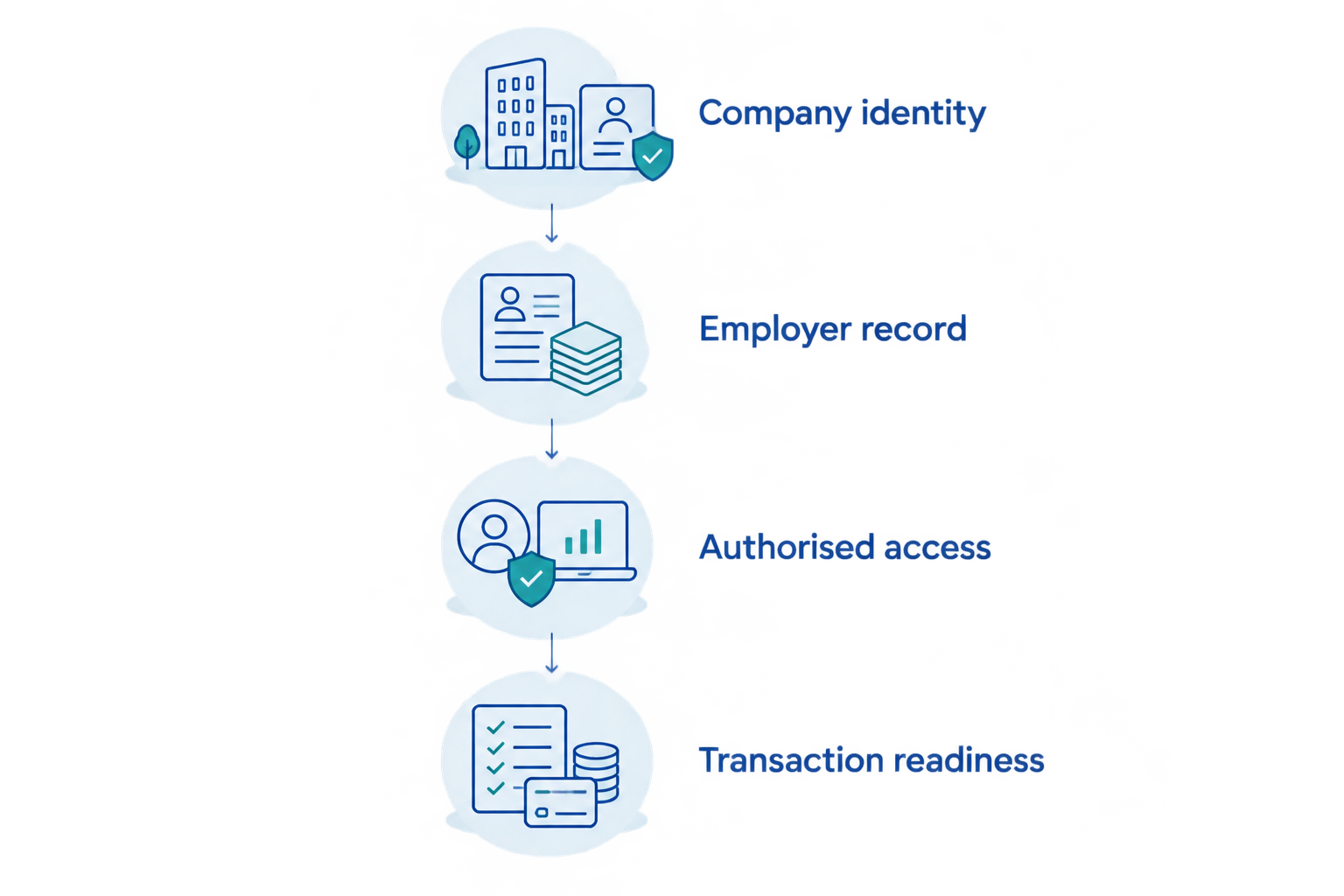
The workflow has 4 verification stages: company identity, employer record, authorised access and transaction readiness. Complete them in that order to avoid troubleshooting the wrong dependency.
Qiwa account access
Configuration unit: authorised access
- Open Qiwa through its official channel and use the current sign-in process. Complete the identity authentication requested for the person who will manage the business account.
- Check whether the intended establishment appears within that user's business access. Match its identifiers, not just a similar trading name.
- If the establishment is missing, verify the user's recognised ownership, management or delegation position before starting another registration. Use the official access or support process to resolve the mismatch.
- Assign only the authority required for the person's responsibilities using the platform's available permissions. Confirm who will maintain access when a manager or service provider changes.
Expected result: The correct person can access the correct establishment through an authorised account. Personal sign-in alone is not sufficient evidence of business access.
Qiwa's interface and authentication instructions can change. For the 2026 workflow, follow the labels displayed in the live official service; do not select an unrelated function because an older screenshot uses different wording.
Keep a simple access register showing the responsible person, their role, the establishment concerned and who approves changes. Record access status, not passwords or authentication codes.
Employment service readiness
Configuration unit: transaction readiness
- Define the first task precisely: employment-contract management, an employee transfer, a work-permit transaction or another available employment service. Check the requirements for that task rather than asking only whether Qiwa is activated.
- Review the establishment conditions and employee-specific conditions stated by the selected service. Separate missing company information from requirements relating to an individual worker.
- Check whether the service requires a subscription or another account-level action. Distinguish government charges, platform charges and any adviser engagement; none substitutes for eligibility.
- Review the transaction information before submission. Where worker acceptance or another party's action is required, assign responsibility for that separate step.
- Retain the official transaction reference and check its final status. Do not treat a saved draft, payment record or submission acknowledgement as a completed employment outcome.
Expected result: You know whether the intended transaction can proceed, what remains outstanding and which party owns each action.
For 2026 implementation, define completion in operational terms: authorised access confirmed, correct establishment selected and the intended service's requirements checked. Avoid a blanket status of activated that hides unfinished work.
Use the guide to Qiwa services for foreign-company HR compliance to extend the workflow beyond initial access. Keep the official service's current eligibility conditions as the controlling reference.
When an existing company's representative changes
A management change creates a second workflow: maintain an existing employer account rather than establish a new one. Do not recreate the company or labour establishment solely to solve a representative-access problem.
- Confirm which ownership, management or delegation record needs updating and complete the applicable official procedure.
- Verify that the authorised representative can access the existing establishment. Check the establishment identifier against your controlled setup record.
- Review existing permissions and remove access that is no longer authorised through the appropriate process.
- Assign responsibility for pending transactions and confirm access to the services needed for ongoing employment administration.
Expected result: The existing establishment remains the working record, with access aligned to the current authorised representatives.
A change of representative does not itself confirm that every employment transaction remains eligible. Recheck any service affected by the change and retain the supporting authority documents.
Choose responsibility before you submit
Both company-led administration and adviser-supported administration require valid authority and accurate information. Choose who owns preparation, submission, corrections and ongoing monitoring before starting.
| Administration route | Best for | Benefit | Limitation |
|---|---|---|---|
| Company-led administration | Foreign companies with a designated Saudi compliance owner | Keeps account management and evidence within the internal team | Requires staff to understand dependencies and maintain permissions |
| Gofico-supported administration | Foreign companies seeking formation and ongoing compliance support | Connects business setup with continuing compliance work | Requires agreed scope, client documents and valid authority; government decisions remain external |
Gofico's support does not remove your company's responsibility for accurate declarations or lawful employment practices. Confirm what the engagement includes, who submits each application and who monitors obligations after setup.
Plan your employer setup
Discuss formation, authorised access and ongoing compliance responsibilities for your Saudi company.
Troubleshooting
The CR is valid, but the establishment is missing
First separate an absent employer record from an account-permission problem. Check whether an establishment record exists, then confirm the user's authority; do not immediately create a duplicate request.
You can sign in but cannot manage the company
Personal authentication and business authorisation are different checks. Verify the recognised management or delegation position and use the official permission-resolution process for the establishment.
Company details differ across records
Identify which authority maintains the incorrect field and correct it at source. Retain the correction reference and verify the revised downstream record before retrying the affected transaction.
Qiwa opens, but a service is unavailable
Read the specific service's eligibility message and requirements. Check establishment conditions, user permissions, applicable account requirements and employee-specific information separately; successful login does not resolve those conditions.
A submitted transaction remains unfinished
Check the recorded status and any outstanding action by the employer, worker or relevant authority. Escalate through official support with the transaction reference and exact error text, excluding unnecessary personal information.
Customize your workflow
Turn initial setup into an ongoing compliance handover. Assign named owners for company-record maintenance, employment administration, Saudization monitoring and access reviews.
Keep 2 types of evidence: authority evidence, showing who can act, and transaction evidence, showing what happened. Store them securely and define who reviews unresolved items.
Coordinate this labour workflow with the company's tax, social-insurance and other applicable obligations. Qiwa access does not replace registrations or duties administered elsewhere.
Gofico can support the connection between business setup and ongoing compliance. Define that support in the engagement scope instead of assuming that formation automatically includes continuing employment administration.
FAQ
Does commercial registration automatically activate Qiwa?
An issued commercial registration does not by itself prove Qiwa readiness. Confirm the labour establishment record, authorised business access and requirements for the employment service you intend to use.
What should a foreign company check before signing in to Qiwa?
Check the company’s official identifiers, labour establishment record and the representative’s authority. A successful personal login does not prove that the correct business establishment is linked to the account.
Can an adviser manage our Qiwa setup?
An adviser needs the authority and permissions required for the relevant actions. Agree the scope of support and use official authorisation arrangements rather than sharing personal credentials.
Why can I access Qiwa but not complete a hiring transaction?
Account access and transaction eligibility are separate. Review the selected service’s establishment conditions, permissions and employee-specific requirements to identify the outstanding action.
Does Qiwa access mean our company meets Saudization requirements?
Qiwa access does not establish Saudization compliance. Check the Nitaqat classification and employment requirements relevant to your establishment and intended transaction.
Should we create a new establishment when our manager changes?
A manager change is not a reason by itself to recreate an existing labour establishment. Update the applicable authority records and permissions, then verify access to the existing establishment.
How do we know the commercial registration to Qiwa activation workflow is complete?
Confirm the company record, employer record, authorised access and readiness for the intended employment service. Treat any submitted employment transaction as complete only when its official status confirms the outcome.
One last thing
Test the handover against a real employment task, not a login screen. Ask the responsible person to identify the correct establishment, explain the next transaction's requirements and locate its official status record. That checks operational ownership without submitting a dummy application.
Related guides
- Compliance obligations for foreign companies in Saudi Arabia
- Saudization strategies to meet Nitaqat requirements
- Professional services to arrange before Saudi market entry