
Instead of repeatedly comparing employee records by hand, build a Qiwa account to GOSI registration workflow around matching establishment details, checking employment contracts and verifying social insurance records. For 2026, treat this as a reconciliation process across government systems—not a separate connection that replaces your employer obligations.
- Qiwa account to GOSI registration requires matching employer and employee records, not just access to both platforms.
- Qiwa manages labour services; GOSI records social insurance registration. Verify each system separately.
- Check Saudization eligibility under applicable rules rather than assuming every registered employee counts equally.
- Gofico supports foreign-company business setup and ongoing compliance; government authorities determine registration outcomes.
Why this matters
Qiwa is the Saudi labour-services platform associated with the Ministry of Human Resources and Social Development, or HRSD. GOSI is the General Organization for Social Insurance. Saudization refers to requirements for employing Saudi nationals; Nitaqat is the establishment classification programme associated with those requirements.
These functions connect, but they are not interchangeable. An employment contract, an insurance registration and a Saudization classification answer different compliance questions.
Gofico is best for foreign companies seeking business setup support alongside ongoing Saudi compliance. Its business setup and compliance services address the wider market-entry process; the relevant authorities still decide government applications.
For a 2026 compliance review, separate 3 checks: whether the employment relationship is documented, whether the insurance record is correct and whether the employee receives the applicable Saudization treatment. Passing one check does not prove the others.
Before you start
- Employer access: Have authorised access to the correct establishment in Qiwa and the relevant employer account in GOSI. Confirm that the person completing the work has permission to view and maintain the required records.
- Source documents: Prepare your commercial registration, establishment identifiers, employee identity details, employment terms and payroll records. A commercial registration records the business's registration; it does not replace labour or social insurance obligations.
- The establishment-matching gotcha: Check which entity or branch employs the worker before changing anything. Similar company names are not enough: a record under the wrong establishment can send you into the wrong correction process.
Keep credentials personal and use formally authorised access. Do not make a consultant's personal login the only route to your company's compliance records.
For 2026 submissions, check current instructions published by Qiwa, GOSI and HRSD before acting. Use their official guidance for the specific service and employee category; a general workflow is not a substitute for an authority's eligibility conditions.
Qiwa and GOSI: which record does what?
Use this comparison to decide where to investigate a mismatch. These systems serve different purposes, so neither replaces the other.
| System or framework | Best for | Practical strength | Limitation |
|---|---|---|---|
| Qiwa | Managing labour-service and employment-contract tasks | Places relevant employer labour services in an establishment context | A Qiwa record alone does not establish that every GOSI detail is correct |
| GOSI | Checking social insurance registration and contribution records | Provides the insurance-side record you need to reconcile with employment and payroll | Insurance registration alone does not prove full labour compliance |
| HRSD's Nitaqat framework | Assessing applicable Saudization classification | Connects workforce composition with establishment classification rules | Counting depends on applicable conditions, not simply the number of names on payroll |
Use the system responsible for the incorrect record. Repeatedly editing a correct contract will not resolve an insurance-side issue that requires a separate correction.
Establishment record alignment
Confirm the employer identity
- Sign in to Qiwa through its official access route using an authorised account. Open the establishment you intend to manage, rather than relying on the establishment displayed by default.
- Compare the establishment's identifiers with your company records. Check the legal entity, relevant branch and establishment information before opening employee-level tasks.
- Sign in to the corresponding GOSI employer account. Compare its employer identifiers against the same source documents.
- Record any discrepancy and identify which authority maintains the incorrect information. Follow that authority's correction procedure before progressing with affected registrations.
Expected result: You can identify the same employing entity across both systems, or you have isolated an establishment-level discrepancy for correction.
Do not search for a universal connection button as proof of completion. Government data exchange does not remove your responsibility to confirm that you are working with the right employer records.
Assign record ownership
- Name the person responsible for Qiwa employment records and the person responsible for GOSI insurance records. The same authorised person can hold both responsibilities.
- Agree which source documents govern identity, employment dates and remuneration details.
- Maintain a shared issue log containing the affected record, the discrepancy, the responsible person and the next action. Keep personal information restricted to authorised staff.
Expected result: Each discrepancy has an owner, rather than circulating between HR, payroll and an external adviser without a decision.
Employment and insurance reconciliation
Check the employment record
- Locate the employee under the correct Qiwa establishment. Compare the identity number against the employee's official identity document rather than matching by name alone.
- Review the employment-contract record and its current status. Complete any employer action required by the applicable Qiwa workflow, and confirm whether employee action remains outstanding.
- Compare the recorded employment terms with the signed employment documentation. Investigate inconsistent dates or remuneration details before treating the file as complete.
- Retain the available contract record or confirmation in the employee's controlled compliance file.
Expected result: The employee's Qiwa employment record matches the supporting documentation, and any outstanding contract action is identified.
A document uploaded internally is not the same as a completed government-platform process. Check the actual status shown for the relevant record.
Verify the insurance record
- Locate the employee in the correct GOSI employer account using the official identity number.
- Check the registration status, employer association and effective dates against the employment documents. Review the remuneration components required by the applicable GOSI rules rather than assuming every payroll total belongs in the same field.
- If the employee is absent or the details are incorrect, follow the current GOSI procedure for that case. Confirm whether the required action is registration, correction or another employer service before submitting it.
- Retain the submission reference and review the resulting record. A submitted request is not proof that the requested change has taken effect.
Expected result: The insurance record matches the supported employment facts, or an identified correction is being tracked through the appropriate process.
Do not assume that completing a Qiwa contract settles every GOSI obligation. Verify the resulting insurance record even where information passes between government systems.
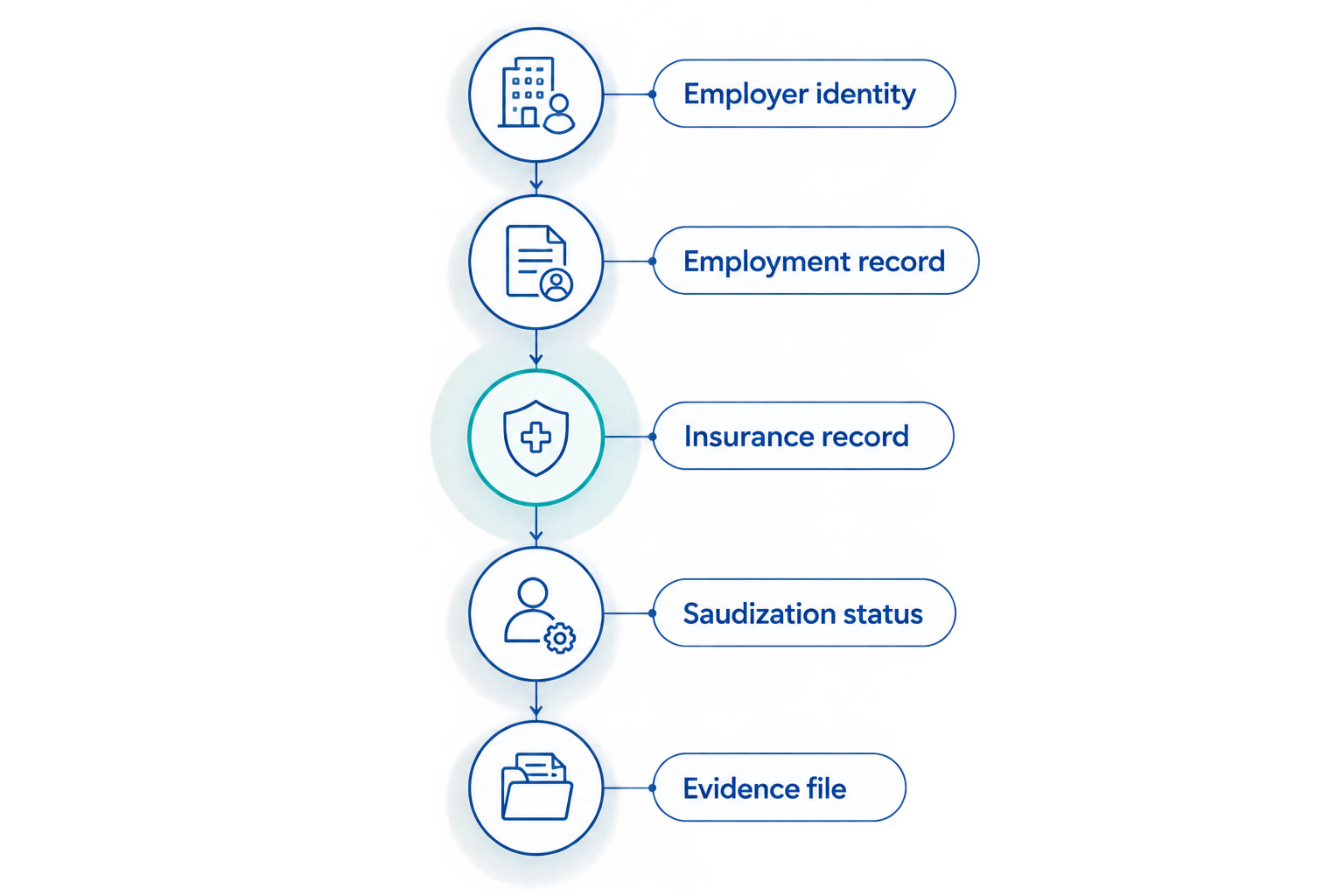
Saudization verification and evidence
Check the classification outcome
- Review the establishment's current Saudization or Nitaqat information through the relevant official service.
- Check the conditions that apply to the employee and establishment. Relevant rules can distinguish between employee categories and impose conditions for counting Saudi employees.
- Compare the classification information with your reconciled employee records. Do not calculate compliance solely from a spreadsheet headcount.
- If the outcome remains inconsistent, raise the issue with the authority responsible for the affected service. Provide the relevant record references and evidence without sharing passwords.
Expected result: You have checked the establishment's displayed classification against its workforce records and identified any unresolved eligibility or data issue.
GOSI registration is evidence of an insurance record, not a guarantee of a particular Saudization classification. Do not recruit against an assumed counting outcome without checking the applicable conditions.
Build the evidence file
- Retain the relevant employment documentation, insurance confirmation and correspondence in an access-controlled employee file.
- Record when each status was checked. Clearly distinguish an application submitted from a change reflected in the system.
- Set the next review around employment changes and applicable filing obligations, rather than relying on memory.
Expected result: Your company can explain what was checked, what remains unresolved and who owns the next action.
Gofico's ongoing compliance support belongs alongside this internal ownership, not in place of it. Your company still needs accurate source documents and authorised decision-makers.
Repeat the workflow when employment details change
A new-hire check is only the first use of this process. For 2026 workforce changes, repeat the relevant checks when employment terms change, an employee leaves or the employing establishment changes.
Best for ongoing HR administration: Use an event-driven review instead of treating initial registration as permanent evidence of accuracy. Its strength is that it ties checks to real employment changes; its limitation is that someone must reliably report those changes.
- Identify the event and its effective date from approved employment documentation.
- Determine which Qiwa and GOSI records require action under the applicable rules. Do not assume that changing one record updates every related service.
- Complete the required procedures and confirm the resulting statuses independently.
- Review the effect on payroll and Saudization reporting, then retain the supporting evidence.
For an employee departure, check the applicable contract and insurance cessation procedures separately. Closing access to an internal HR system does not complete a government record change.
For an establishment change, confirm the correct legal procedure before creating replacement records. Duplicating a record is not a safe workaround for an unresolved transfer or employer-identity issue.
Troubleshooting
The employee appears in Qiwa but not in GOSI
First confirm the identity number, employing establishment and contract status. Then check whether a GOSI-side registration action or unresolved submission exists; do not repeatedly create employment records to force a match.
The employee appears under the wrong establishment
Compare the employer identifiers with the employment documents and confirm whether the issue involves a branch, an incorrect entry or an actual change of employer. Use the appropriate official correction or transfer procedure instead of deleting records without understanding the consequences.
The contract still needs employee action
Ask the employee to review the outstanding action through their own authorised access. Confirm completion from the platform record; an email saying the contract was accepted is not a substitute for checking its status.
The employee is insured but Saudization has not changed
Check the applicable counting conditions and the classification information for the correct establishment. Review official guidance on how the relevant service reflects changes, then raise a documented enquiry if the records remain inconsistent; do not assume a fixed refresh interval.
Employment and insurance dates or remuneration disagree
Compare both records with approved employment and payroll documents, then identify the incorrect entry. Correct it through the responsible authority's process and keep the reason for the correction; do not change accurate employment facts merely to make the screens agree.
Customize your workflow
Build your 2026 compliance process around 1 employee file with separately verified employment, insurance and classification evidence. This reduces reliance on disconnected screenshots while preserving the distinction between the different obligations.
Add payroll review, authorised-access checks and responsibility for government correspondence to the same operating procedure. Keep commercial registration and other company-level obligations on a separate calendar so that an employee-registration task does not become your entire compliance programme.
Ask Gofico to scope the work before appointing support: identify the affected establishments, employee-record issues and ongoing responsibilities. Separate government requirements and charges from the adviser's service scope, and agree who will submit, approve and retain each record.
Review your Saudi compliance workflow
Discuss establishment records, employee registration and ongoing compliance responsibilities.
FAQ
How do I connect my Qiwa account to GOSI registration?
Reconcile the correct employer and employee records across Qiwa and GOSI, then complete any required registration or correction procedures. Do not treat access to both accounts as proof that the employment and insurance records are complete.
Does accepting a Qiwa contract prove GOSI registration is complete?
No. Verify the employee’s resulting registration and details in GOSI separately, even where government systems exchange information.
Does every Saudi employee registered with GOSI count equally for Saudization?
No. Saudization treatment depends on the applicable counting conditions and establishment rules, not insurance registration alone. Check the current official conditions for the employee category.
What documents should a foreign company prepare?
Prepare employer registration details, establishment identifiers, employee identity documents, employment terms and relevant payroll records. Check the official service requirements for any additional documents needed for the specific application.
What should I do if Qiwa and GOSI show different employment details?
Compare both records with approved source documents and correct the inaccurate record through the responsible authority. Keep submission references and verify that the correction is reflected.
How long does a Qiwa or GOSI correction take?
Check the current service guidance and the status of your specific request rather than relying on a fixed processing promise. Submission and completion are different stages.
Can Gofico help with registration and ongoing compliance?
Gofico provides company formation, PRO, compliance and consulting services for foreign investors and entrepreneurs in Saudi Arabia. Agree the specific registration tasks and ongoing responsibilities in the service scope; government authorities determine outcomes.
One last thing
A clean record is not just a matching name. Before closing a case, match the employee identity, employer identity and effective employment facts across the relevant records. A tidy spreadsheet can still conceal a registration under the wrong establishment.
Related guides
- Qiwa services for foreign-company HR compliance
- Saudization strategies to meet Nitaqat requirements
- Compliance obligations for foreign companies in Saudi Arabia